

Freedam

For teams running campaigns from shared folders

A DAM for a growing marketing team

Sales may ask for product images every week, and an agency may end up using last season’s brochure. Freedam gives your team one visual library where people can find the current version themselves.

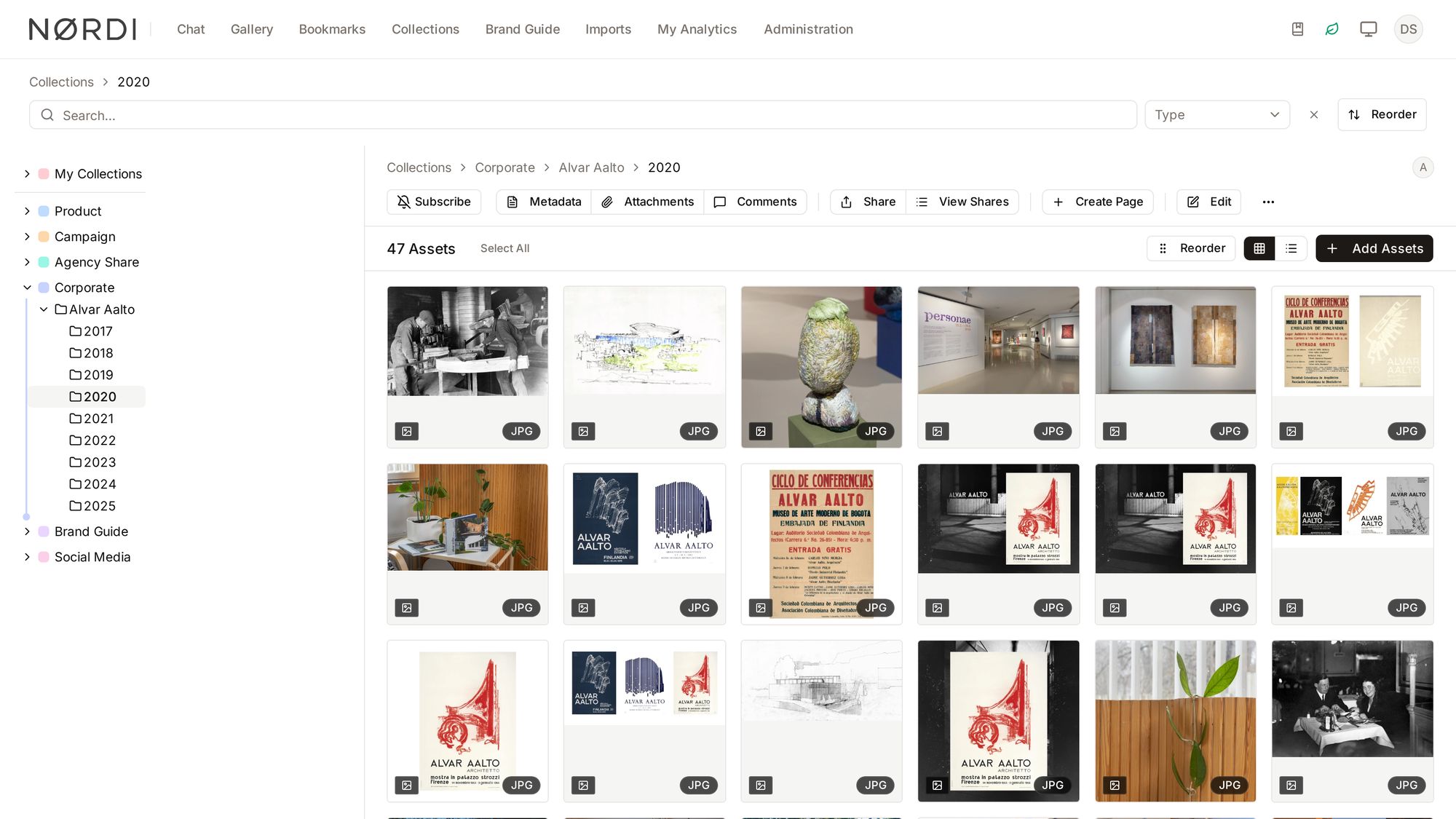
Freedam — real product screen
A Freedam collection page: the collection tree on the left and a grid of 47 approved images with share, metadata and edit actions
A real Freedam collection: the tree on the left, the asset grid on the right, and share, metadata and version actions in one toolbar.

Do you need a DAM yet?

It usually comes down to how often people look for files

If finding, checking and sending files takes up a good part of someone’s week, a DAM will probably help. If it does not, shared folders may be all you need.

Situations we often hear about

A DAM may help when…

Marketing gets the same file requests most weeks. Several versions are in circulation and it is hard to tell which is current. Agencies, sales or dealers often need new material. Rights, consent and expiry dates are hard to keep next to the file.

Situations where less may be enough

Shared folders may be enough when…

One person can find everything quickly and requests are rare. Files rarely change and are mostly used by the people who made them. There is little rights, approval or external sharing to keep track of. No one has time to tag files and manage access once it is set up.

How to start

Start with one campaign

Pick the product line or campaign people ask about most, put it in Freedam and ask a few colleagues to try it. You can add more from there.

  1. 01

    Pick one campaign

    Choose the product line or campaign people ask for most, so the trial looks like a normal week.

  2. 02

    Add the basics

    Tag files by product, campaign, market and rights. The rest can wait.

  3. 03

    Upload the files

    Drag and drop them, or connect the Google Drive, WebDAV or S3 storage you already use.

  4. 04

    Invite the people who ask

    Give sales, an agency or a dealer a collection or portal and see whether the requests slow down.

Compare plans with how you work

The pricing page lists current storage, administrator and feature limits.

See pricing and plans

Questions buyers ask

Before you make the change

Is a DAM useful for a small business?

It can be, when a small marketing team supplies files to many people, channels or markets. How widely files are shared, how many versions are around and which rights you need to track usually matter more than headcount.

How do we know it is still too early?

Shared folders may still be enough when one person can find everything, files rarely change, you seldom send files outside the company and there are few rights or approval requirements.

Do we have to move everything at once?

No. You can start with one current campaign, product line or set of approved files. Upload directly or connect a source, then add structure as you learn what people look for, without planning a full taxonomy up front.

Where can we compare plans?

The pricing page lists current plans, storage limits, administrator allowances and included features. It usually helps to choose based on how your team works and who needs access.

See it with work you already know

Try it with a sample campaign

Going through a familiar campaign in the actual product may help you decide whether search, versions, rights and sharing would make your team’s week easier.

Curious how yours would look? Generate a brand center from your website, free, in about a minute.