
Analytics Insights
Every night, Freedam reads your workspace's searches, downloads and asset activity and turns what it finds into a short list of things to act on: terms people search for that return nothing, assets nobody opens any more, users who search but never download, and so on. They appear on the Insights tab of the Analytics Dashboard, and the three most urgent on its Overview tab.
Insights are computed with fixed rules on your own activity data, inside your workspace. No AI model is involved and no data leaves the workspace. Each rule is described below, with its thresholds, so you know exactly why an insight appeared.
Who can see insights
The Insights tab is part of the Analytics Dashboard, which needs the Open the analytics dashboard permission and the Analytics feature of your plan (Business and Tailored).
Reading an insight
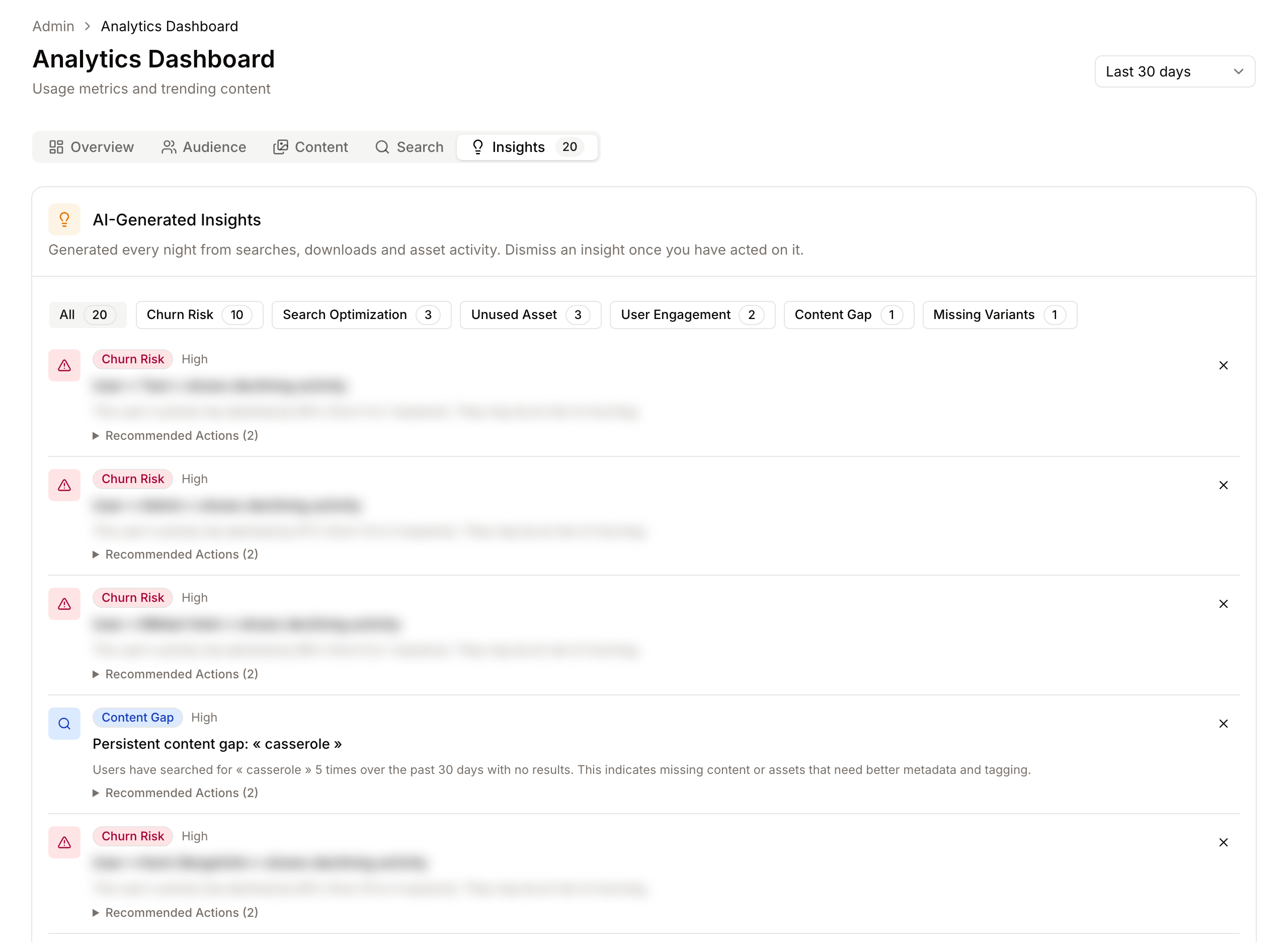
Each insight shows:
- Its type (for example Content Gap) and priority: High, Medium or Low.
- A title and a description with the figures behind it, for example the search term and how many times it found nothing.
- Recommended Actions, a short list of what to do.
- An X button, Dismiss insight, to remove it from the list once you have acted.
The list is sorted by priority, then newest first, and shows up to 20 insights. The buttons at the top filter the list by type, with the number of insights of each type. The Insights tab shows the total count.
The insight types
Every rule looks at a fixed window of time, whatever period is selected on the dashboard.
Searches
| Type | When it appears | Priority |
|---|---|---|
| Content Gap | A search term returned no results at least 3 times in the last 30 days. Up to the 10 most frequent terms. Asset IDs typed into the search are ignored. | High from 10 failed searches, otherwise Medium |
| Search Issue | A search term returned no results at least twice in the last 7 days. Up to 5 terms. A term that keeps failing becomes a Content Gap. | Medium |
| Search Optimization | A term was searched at least 5 times, in at least 3 different visits, with at least 5 results each time, and more than 70% of those searches ended without a click on any result. Up to 5 terms. | Medium |
| Typo Tolerance | At least 10% of searches, and at least 20 of them, only found results thanks to typo correction. People are often misspelling names your metadata uses. | Medium |
| Typo Tolerance (ineffective) | At least 10 searches used typo correction and still found nothing, at least 30% of the time. | High |
| Taxonomy Suggestion | A term is searched at least 3 times in 30 days but is rarely applied as a filter value. Adding it to a vocabulary would let people filter on it. Up to 5 terms. | Low |
What to do: for a content gap, check whether the assets exist under another name (add the term as a keyword or a vocabulary synonym) or whether they are missing (ask for them). For a search optimisation insight, search the term yourself and look at the first results: people see results but not the right ones, so the metadata of the right assets probably lacks the term.
Assets
| Type | When it appears | Priority |
|---|---|---|
| Declining Performance | An asset's daily views were rated declining on at least 3 of the last 14 days. Up to 10 assets. | Medium |
| Content Fatigue | An asset had at least 100 views and downloads between 30 and 90 days ago, and much less since. Up to 10 assets. | Low |
| Missing Variants | An asset had at least 50 views and downloads in 30 days and has no linked assets. Popular assets usually need other formats, crops or language versions. Up to 10 assets. | Medium |
| Metadata Quality | An asset had at least 20 views and downloads in 30 days and has missing fields. The most used assets are the ones whose metadata matters most. Up to 10 assets. | Medium |
| Unused Asset | An asset older than 90 days had no activity in the last 90 days. Up to 10 assets. | Low |
What to do: for missing variants, produce the formats people need from the master (see Studio) and link them to it (see Linked Assets). For unused assets, see the Orphan Assets page, which lists every unused asset with the same idea and lets you clean them up in bulk.
How a day is rated declining is explained under Asset Performance Tracking on the Analytics Dashboard page.
Vocabularies
| Type | When it appears | Priority |
|---|---|---|
| Unused Taxonomy | A vocabulary term older than 60 days has never been used on an asset. Up to 10 terms. | Low |
What to do: merge the term into one that is used, or delete it, on the Vocabularies page. A vocabulary with fewer, used terms is easier to tag with.
People
| Type | When it appears | Priority |
|---|---|---|
| User Engagement | A person had at least 5 visits in 30 days, searched, and never downloaded. Up to 5 people. | Medium |
| Churn Risk | A person had at least 5 visits in the 30 days before last month and clearly fewer in the last 30 days. Up to 5 people. | High |
What to do: these name people, so treat them with care. A person who searches without downloading often cannot find what they need, or cannot download it because of an access rule. Ask them, and check the Asset Access Tester with their account.
When insights are generated and removed
- Generation: every night at 3:00 (server time), for each workspace.
- Expiry: an insight that is still active 30 days after it was created expires and leaves the list.
- Dismissing: dismissing removes the insight from the list and records who dismissed it. The same insight is not created again for 30 days. After that, if the condition is still true (the term still fails, the asset is still unused), the nightly run creates it again. Fix the cause, not only the insight.
- Clean-up: dismissed insights are deleted 30 days after they were dismissed, expired ones 7 days after they expired.
- Freshness: the Analytics Dashboard is cached for 15 minutes. Dismissing an insight clears the cache at once.
Good to know
- Searches by Freedam's support staff, monitoring probes and bots are not counted, so they never produce insights.
- Insights are not available through the API or as an export.
Troubleshooting
Issue: The Insights tab is empty
- Cause: Your workspace has too little activity for any rule to apply, or every condition is resolved. Most rules need several searches or visits over 7 to 90 days.
- Fix: Wait a few weeks after launch. Check the Search tab: if it has searches, the content gap and search rules will start to apply once terms repeat.
Issue: A dismissed insight came back
- Cause: It was dismissed more than 30 days ago and the condition behind it is still true, so the nightly run created it again.
- Fix: Resolve the cause: add the term to your metadata or vocabularies, link the variants, or clean up the unused assets or terms.