
Publishing
The Publishing page sets up publication channels. A channel publishes the images its conditions select, as far as their usage rights allow, through image links that do not expire. Paste such a link into a website or a CMS: the image keeps showing until it leaves the channel.
You find the page under Administration → Platform → Publishing. You need the Manage publishing permission. Publishing and the Microsoft 365 channel come with the Business and Tailored plans.
Channels
There are two kinds of channel:
- Website channels, which you create, one per website or destination. Their links are meant for web pages and CMSs.
- The Microsoft 365 channel, created when you connect Microsoft 365 on the Microsoft 365 Copilot page. Its links are sent to Microsoft 365 only and are not shown on asset pages.
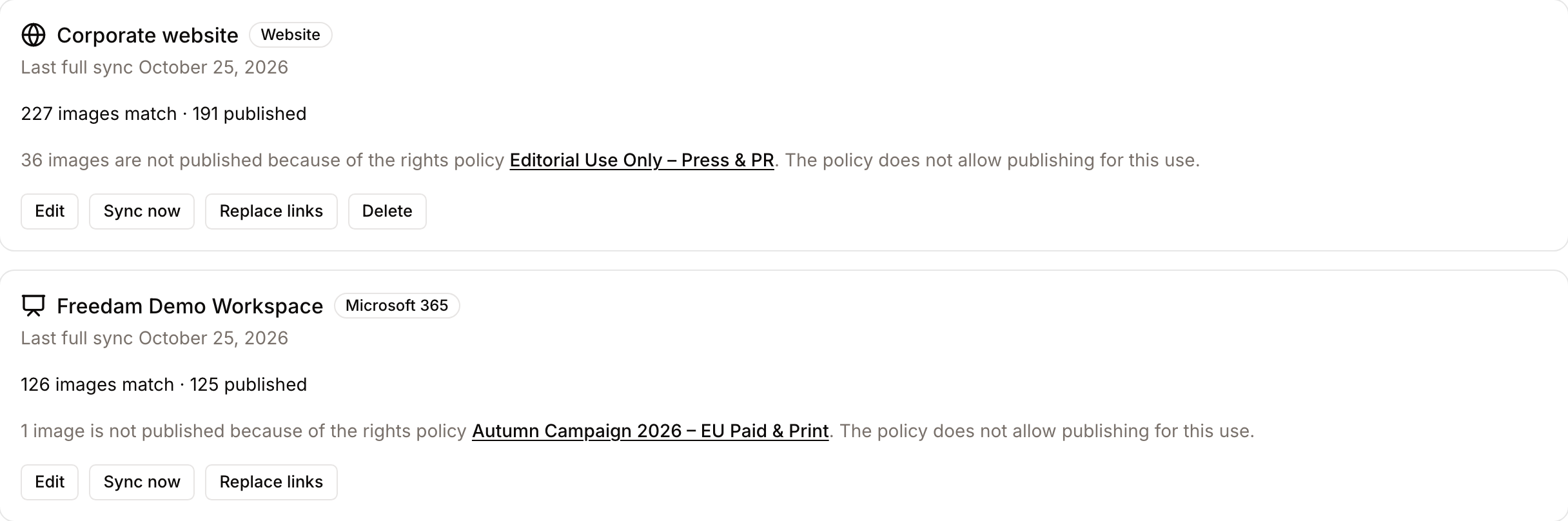
Each channel card shows how many images match its conditions, how many are published, and the date of the last full sync.
Create a website channel
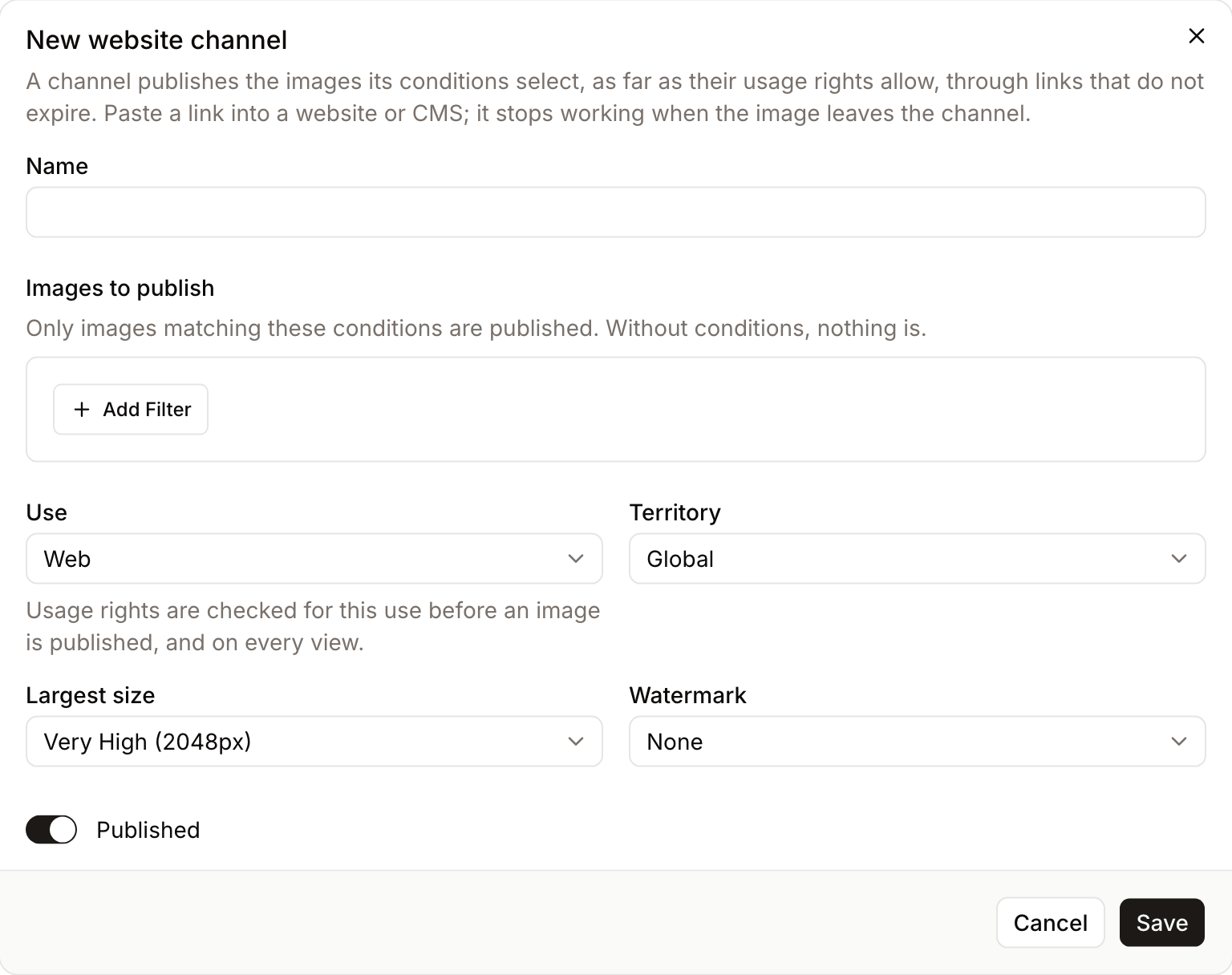
Click New channel and fill in the form.
Images to publish
Add one or more conditions, for example a vocabulary field such as Brand status equal to Approved, or membership of a collection. The number of matching images updates as you edit. Without conditions, nothing is published.
Only images are published, never other file types. Archived assets, assets in the trash and images still being processed are left out whatever the conditions say.
Usage rights
Use and Territory say where the images will appear, for example web use worldwide. Before an image is published, Freedam checks its rights policy for that use and territory. For an internal use, a policy that allows publishing for any external use, such as web, print or social, counts too, unless it prohibits internal use.
- An image whose rights forbid that use or territory, or whose rights have expired, is not published.
- An image whose rights require a watermark is published only if the channel has a watermark.
- An image whose rights require attribution is published, and its asset page says so next to the link.
- An image whose rights carry any other obligation is not published.
The check runs again on every request for the image, so an image whose rights expire stops showing.
When a rights policy keeps images from being published, the channel card on the Publishing page says so: how many images, the name of the policy and the reason. If you can manage rights policies, the name links to the policy, where you can add the Publish action for the channel's use. Policies created from the default template since October 2026 include Publish; older default policies and custom policies may not.
Largest size and watermark
Largest size is the widest version a link can serve, from 128 px to 5K (5120 px). Links exist for each size up to the largest one. The original file is never published. Sizes above 2048 px put the high-resolution versions on the web for anyone with the link, whatever download rights people have in Freedam, so choose them only for a channel meant to carry them.
Watermark applies a watermark of the workspace to every published image of the channel. The list appears when your plan includes watermarks.
Published
Turn off Published to stop serving every image of the channel without deleting it. Its links answer as if the images did not exist until you turn it on again.
Click Save. Freedam selects the matching images in the background; the published count fills in within minutes.
Copy an image link
Open an asset that a website channel publishes. The Details tab shows a Published on section with each channel that publishes it. Choose a size and click Copy URL, then paste the link into your website or CMS.
If the asset's rights require attribution, the section says so. Credit the image where you publish it.
How the links work
A published link looks like https://{workspace}.freedam.io/i/w=1024/{asset ID}/{channel key}/{signature}. It does not expire and does not identify the person who copied it.
- A link keeps working as long as the image matches the channel's conditions, its rights allow the channel's use, and the channel is published.
- When an image leaves the channel, its link answers "not found". Websites and CDNs may keep showing a cached copy for up to 5 minutes.
- Images are sent with caching headers that let a CDN keep them for 5 minutes, and with CORS headers that let any website load them.
Keep the images in sync
Freedam adds and removes images on its own when assets are edited, moved through a workflow or have their rights changed, and checks every channel again every night, which catches rights that expire. Two buttons on each channel card cover the other cases:
- Sync now checks every image of the channel again.
- Replace links makes every link of the channel stop working and creates new ones, after a confirmation. Use it if the links were used somewhere they should not be. Every link already pasted into a website must then be copied again.
Delete removes a website channel. Its links stop working.
The Microsoft 365 channel
Click Edit on the Microsoft 365 channel to choose the images Microsoft 365 receives, their use and territory, their largest size and their watermark. Its name and its connection are managed on the Microsoft 365 Copilot page, and it cannot be deleted here: disconnecting Microsoft 365 removes it.